
Construction Master Pro App Adds Materials Mode to Support Material Estimating and Takeoffs
Calculated Industries has introduced a new Materials Mode in the Construction Master Pro (CMPro) app, giving users a simplified key layout for material estimating and everyday calculations. Designed based on contractor feedback, the optional mode provides faster access to common material and geometry functions, making early takeoff work more efficient.
Reno, NV, January 29, 2026 --(PR.com)-- Calculated Industries, a leading manufacturer of specialty calculators and construction tools, has added a new Materials Mode to the Construction Master Pro (CMPro) app, giving subscribers a focused key layout designed for material estimating and everyday number crunching.
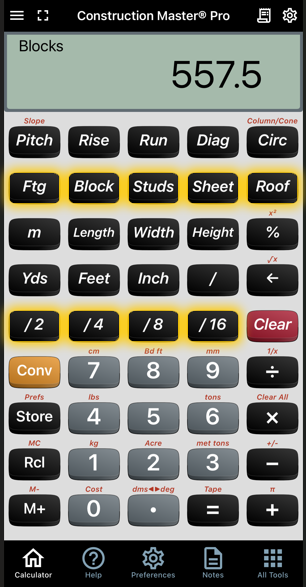
Materials Mode places commonly used material and right-triangle functions into a row of primary keys, allowing users to access them without relying on second-function keys. This optional mode is intended for users who prefer a simpler, more streamlined layout when working with material quantities and basic geometry.
In Materials Mode, users can access Pitch, Rise, Run, and Diagonal functions alongside material keys such as Footing, Block, Studs, Sheet, and Roof. Length, width, and height keys, along with dedicated fast fraction keys, are also positioned for quicker input.
“At Calculated Industries, all of our app updates are based on feedback from construction professionals who use our tools every day,” said Steve Kennedy, President of Calculated Industries. “Materials Mode was developed in response to the need for estimators to move through common material calculations more easily, especially during early takeoff work.”
Materials Mode is currently available to CMPro iOS subscribers. Android availability is planned for a future release.
For more information about CMPro and its Materials Mode features, visit calculated.com.
Materials Mode places commonly used material and right-triangle functions into a row of primary keys, allowing users to access them without relying on second-function keys. This optional mode is intended for users who prefer a simpler, more streamlined layout when working with material quantities and basic geometry.
In Materials Mode, users can access Pitch, Rise, Run, and Diagonal functions alongside material keys such as Footing, Block, Studs, Sheet, and Roof. Length, width, and height keys, along with dedicated fast fraction keys, are also positioned for quicker input.
“At Calculated Industries, all of our app updates are based on feedback from construction professionals who use our tools every day,” said Steve Kennedy, President of Calculated Industries. “Materials Mode was developed in response to the need for estimators to move through common material calculations more easily, especially during early takeoff work.”
Materials Mode is currently available to CMPro iOS subscribers. Android availability is planned for a future release.
For more information about CMPro and its Materials Mode features, visit calculated.com.
Contact
Calculated Industries
Stacie Griffin
775-224-7038
calculated.com
Stacie Griffin
775-224-7038
calculated.com
 Contact
Multimedia

Calculated Industries
Calculated Industries has been helping professionals work smarter since 1978. CI has delivered industry-specific calculators, apps, digital measuring and estimating devices, and other innovative tools that make complex work simple. All products are designed and supported in Carson City, Nevada.
Categories